


Home » Software
ERP & CTRM software
Qbil-Trade combines ERP and CTRM in one platform, built for traders of commodities, raw materials and ingredients. The CTRM side covers contracts, positions and risk. The ERP side runs orders, logistics, stock, production and finance. Because everything sits in one database, you enter data once and see the effect on your position straight away.
All functionality is included and pricing is based on usage. Call or email us for a no-obligation indication of the annual cost for your company.
One platform, from contract to P&L

What Qbil-Trade covers

The position list shows your purchase and sales contracts, stock and planning in one overview, per product and per period. You choose whether scheduled orders and weighted average prices are included.
- Workbench: your position and the items that need attention, together on one screen.
- Futures: futures positions alongside your physical position.
- Currency hedging: hedge currencies per contract.
- Precalculation and P&L: from the first calculation to the result per contract.
- Mark-to-market: value open positions against current market prices.

Purchase and sales contracts hold supplier and product data, trade terms, pricing and delivery planning. They are the starting point for call-off orders and deliveries.
- Multiple contract lines on one contract or offer
- Offers that convert into sales contracts
- Brokers and commission agents
- Approval notifications for contracts
- Manufacturers registered on contracts and orders
- XConnect: exchange contracts directly with your trading partners

Order management handles call-off orders, direct orders and back-to-back deals. Stock can come from inventory, warehouse locations or purchase contracts, and destinations range from customers to storage sites. Contract quantities are deducted or reserved as soon as you enter an order.
- Transport orders and CMRs
- Documents such as Bill of Lading instructions, delivery confirmations and certificates (health, quality, halal, kosher), set up in the Document Designer
- Attachments per lot
- Production orders
- Dry matter calculation
- Mass Balance for biofuel producers and traders

The planning screen shows all planned movements: past, present and future. Open contract quantities can be scheduled directly, and alerts show which orders need attention. Logisticians filter, use calendar views and create new orders from the same screen.

Purchase and sales administration runs in the same system as your trades.
- Invoice scanning and recognition, matched to orders
- Sales invoices sent as e-invoices (UBL) via the Peppol network, enabled per customer
- Debtor and creditor screens
- Control over payments
- Credit limits, position limits and currency hedging per contract
- User permissions and approval workflows
- Liabilities register for the monthly closing
- Export of invoices and relation data to your accounting system, including Exact Online and Topal

More than 50 reports, including position lists, mark-to-market and purchase and sales statements. Web Reports add graphs and pivot tables. The iPhone app shows your positions and stock levels when you are away from the office.
AI Assistant: the AI Hub gives quick access to features and summaries, and with Voice Mode you can ask your question out loud.
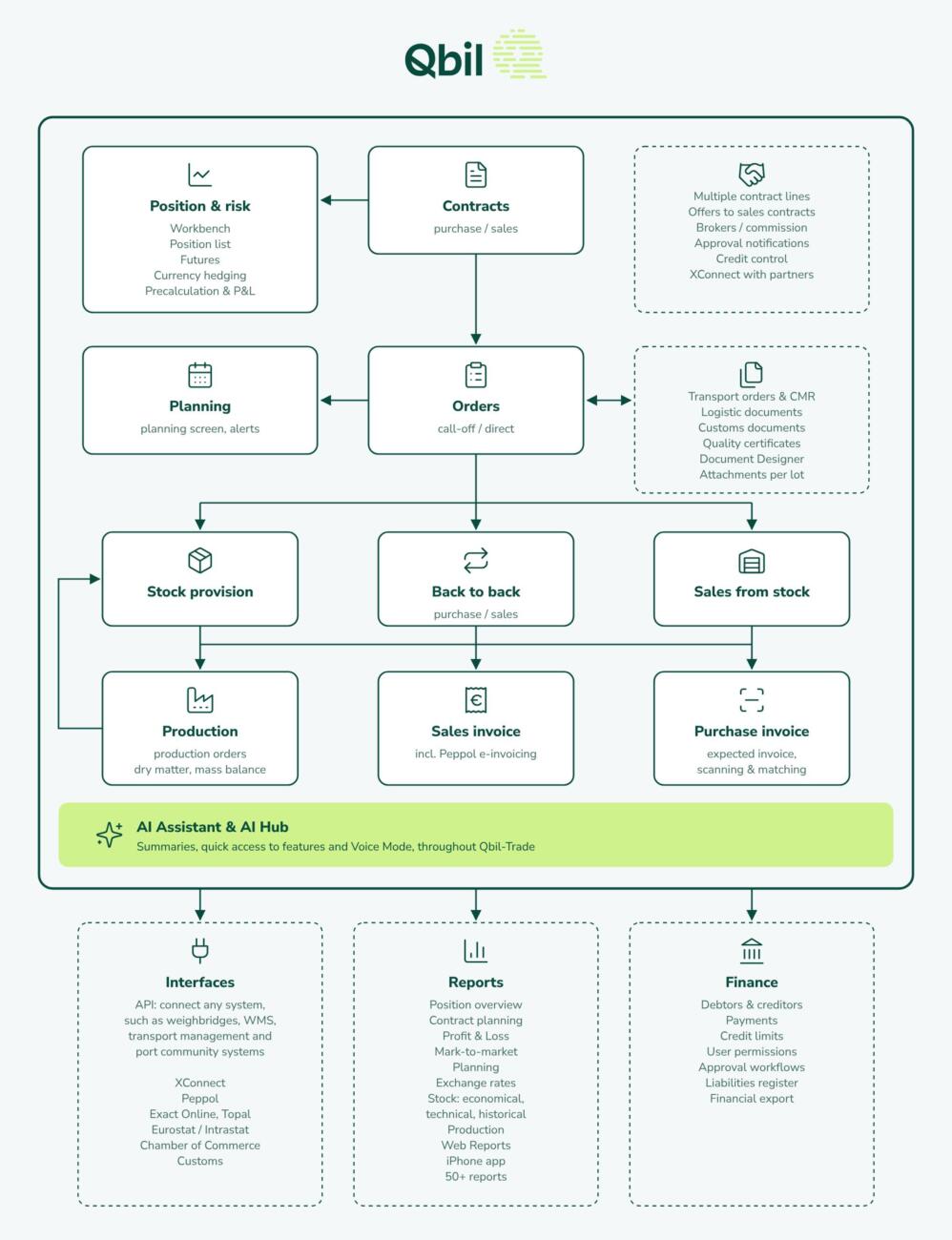
The diagram shows how trading, production and logistics come together in Qbil-Trade, for sectors such as grains and seeds, green coffee, feed ingredients, milk and dairy ingredients, and oils and fats.
ERP vs. CTRM vs. Qbil-Trade
See how they compare
Are you deciding between extending your current ERP system or investing in a separate CTRM solution? Qbil-Trade combines both in a single database, covering the entire process from contract to invoice.
Integrations
Connect Qbil-Trade to your other systems
- API: connect Qbil-Trade to your own systems and those of your partners.
- XConnect: exchange contracts directly with your trading partners.
- Peppol: send sales invoices as structured e-invoices, directly from Qbil-Trade.
- Accounting: export invoices and relation data to your accounting system, including Exact Online and Topal.
In a live demonstration, we show how Qbil-Trade handles your contracts, positions and logistics, and we answer your questions.

Security, privacy, and control—properly in place.
At Qbil Software, security and reliability are not afterthoughts. They are built into the foundation of our software, processes, and organization. This is reflected in our compliance with internationally recognized standards and European regulations: ISO 27001, ISO 27701, and NIS2.
Together, these frameworks ensure that information security, privacy, and digital resilience are not handled ad hoc, but are managed, monitored, and continuously improved.
Frequently asked Questions
What size companies use Qbil-Trade?
On average, our clients have around 15 users. Our smallest client works with one user, our largest with about 60. The annual turnover of our clients ranges from €500,000 to €5 billion.
Do you offer an on-premise version of Qbil-Trade?
No, Qbil-Trade is exclusively available as an online solution.
Do I need to purchase a new version if the software is updated?
No, our software is continuously improved through regular updates. Some of our clients have been using Qbil-Trade for over 15 years without needing to buy a new version or undergo a fresh implementation.
How can I explore Qbil-Trade before purchasing?
We offer two ways to get a clear understanding of our software:
- Demo video – A video introduction showcasing the key functionalities of Qbil-Trade.
- Live demonstration – Schedule a session with an expert for a real-time overview of the software and answers to all your questions. Request a demo via our website.
How is payment handled?
Invoices are issued with a standard payment term of 10 days. Payments are made via bank transfer.
How does pricing work?
Qbil-Trade uses usage-based pricing. All functionality is included, so there are no separate modules to buy. Would you like to know what Qbil-Trade would cost your company per year? Call us on +31 (0) 318 50 20 26 or email info@qbilsoftware.com for a no-obligation indication.